Frequently asked questions
Answers about logging, custom fields, importing records, backups and plans.
Getting started and plans
What can I use for free?
You can log basic measurements such as weight, reps and time, record each side separately, view your history and use basic analysis. There is no limit on the number of exercises or routines you create. Exporting records, backups and restoring backups are also free.
Creating your own custom fields and setting up gyms and machines requires Pro or Lifetime. You can try these features free for the first 14 days.
What is the difference between Pro and Lifetime?
They include the same features. Pro is a monthly or yearly subscription. Lifetime is a one-time purchase. Both include custom fields, gym and machine settings, and unlimited Bridge imports. Prices are shown on the purchase screen in the app.
Will I be charged automatically when the free trial ends?
No. After the initial 14-day trial, you move to the free plan. You will not be charged unless you choose to purchase a paid plan. You do not need to cancel the trial.
What happens to my records and custom fields when Pro ends?
Your past records remain after your paid access ends. You can still view and export historical custom-field values and machine information, and continue logging with the free basic fields.
Creating or editing custom fields, entering or changing their values, analyzing custom fields, and setting up or selecting gyms and machines requires Pro or Lifetime.
Can I move records from my current app or spreadsheet?
To import records from another app or a spreadsheet, you must convert them to RENMA format first. The original files cannot be imported as they are. You can use an external AI to help with the conversion.
What can be transferred depends on the information in the source data. After conversion, check the contents in RENMA's preview before importing.
Where are my records stored?
Your records are stored on your smartphone. RENMA does not automatically send your workout records to a RENMA server.
To use them with an external AI or another service, you export and share the files yourself. Keep a backup outside your phone as well.
Can I transfer my records when I change phones?
Yes. Export a RENMA backup on your old phone and restore it in RENMA on your new Android phone. Before giving up the old phone, save the backup on another device or storage you control.
Pro and Lifetime purchases are restored separately from your records, using the Google account you purchased with.
Can I export my records as CSV or other files?
Yes. You can export to formats such as CSV and JSON. Even on the free plan, you can take your records with you, including previously recorded custom-field values.
Exports for spreadsheets and other services serve a different purpose from a RENMA backup. To prepare for a new phone or device failure, save a backup.
Do I need AI to log workouts or set things up?
No. You can set up exercises and routines and log every workout using RENMA alone. External AI is an optional way to convert old records or prepare settings in bulk. RENMA does not have a built-in AI chat.
Does all this customization make setup and daily logging complicated?
You can start with just the basic fields. Add other fields when you need them and save your setup in routines, ready to select next time.
While logging, you can adjust numbers with the + and − buttons beside a value, or scroll to choose a number. You do not have to type every number again with the keyboard.
Can I use RENMA without NFC tags?
Yes. You can select a routine in the app and log your workouts without NFC tags. NFC is an optional shortcut for opening a routine by holding your phone near a registered tag. The NFC feature itself is free.
Is there an iPhone version?
An iPhone version is not currently available. RENMA is being developed for Android, and the Android release is in preparation. There is no announced date for an iPhone version.
Logging and custom fields
How are basic fields different from custom fields?
Basic fields, such as weight, reps and time, are built into RENMA and are free to use.
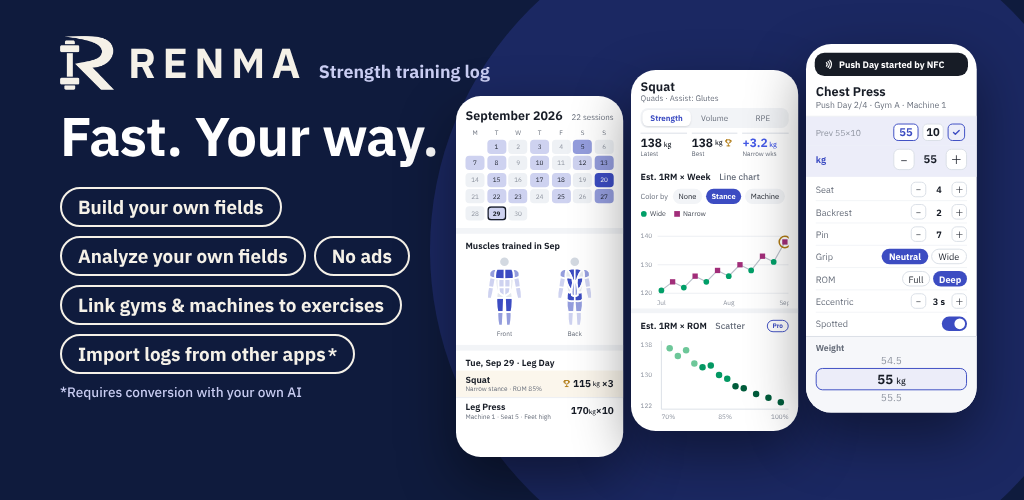
Custom fields are fields you add to suit an exercise. For a chest press, you could add seat position, pin position and grip. You choose the names and options. Creating these fields and logging new values requires Pro or Lifetime.
What kinds of custom fields can I add?
Choose from 10 field types. You can name each field and define its options yourself. For example, you can record machine positions, equipment, movement speed and notes for each exercise.
| Field type | Example |
|---|---|
| Number | Seat position: 4 |
| Single choice | Grip: vertical / horizontal |
| Multiple choice | Equipment: belt + wrist wraps |
| Yes / no | Straps used: yes |
| Weight | Extra plate: 2.5 kg |
| Time | Lowering phase: 3 seconds |
| Distance | Distance walked: 20 m |
| Percentage | Range of motion: 90% |
| Custom unit | Band resistance: level 3 |
| Text | Note: right hand gives out first |
Can I record different weights or reps for my left and right sides?
Yes. Record each side's weight and reps separately, for example, left: 40 kg × 10 reps, right: 40 kg × 8 reps. Logging each side separately with basic fields is free.
Does RENMA support bodyweight, added weight, assistance, kg and lb?
Yes. RENMA supports exercises using bodyweight, added weight and assistance. You can switch between kg and lb in settings and choose a logging method that suits the exercise.
Can I distinguish machines with the same name at different gyms?
Yes. You can manage the chest press at your local Gym A separately from a chest press at another gym. You can also record seat positions, pins and grips using your own fields. Setting up or selecting gyms and machines, and logging custom-field values, requires Pro or Lifetime.
Is there a limit on how many exercises or routines I can create?
There is no limit on the number of exercises and routines you create, even on the free plan. Make the routines you need for your training split or different gyms. Custom fields and gym and machine settings are separate paid features.
Can I add or edit records for past dates?
Yes. You can choose a past date to add a workout or edit saved records. Entering or changing custom-field values or machine assignments requires Pro or Lifetime.
Can I record photos, body weight and goals too?
Yes. Alongside your workout records, you can save photos and body-weight entries, set goals and check your progress. Photos are stored on your device too, so back them up with your records.
How can I analyze custom fields?
Custom-field records can be used in analysis according to the field type. You can review changes in recorded numbers and look beyond weight and reps at the conditions you recorded. Custom-field analysis requires Pro or Lifetime.
Importing records and setting up
How is importing records different from restoring a backup?
Importing applies records or settings prepared in a supported format. Use it to move from another app or set up routines in bulk.
Restoring a backup brings data back from a backup saved by RENMA. Use it when changing phones or preparing for device failure. It does not automatically merge with the current data, so save a backup of your current data before restoring.
Do I need AI or a paid plan to move records from an older RENMA version?
Importing records through Bridge is limited to once every 30 days on Free. Pro, Lifetime and the free trial have no import-count limit.
Restoring a RENMA backup requires neither AI nor a paid plan. Backup restores do not count towards this import allowance.
Direct imports of a supported legacy RENMA CSV through the dedicated feature are also exempt from the count limit and need no AI conversion. This exception does not apply to files from other apps or to general CSV files.
Can I move records from Hevy, Strong or 筋トレMEMO?
You must convert the records exported from the original app to RENMA format before importing. The original files cannot be imported as they are. You can use an external AI to help convert them.
The fields you can transfer depend on the information in the original file. After conversion, check dates, exercises, weights, reps and other details in the preview before importing.
Can I import any CSV or Excel file as it is?
A file being CSV or Excel does not make it directly importable. Dates, exercises and recorded fields must be arranged in a format RENMA can read. Supported legacy RENMA CSV files have a dedicated direct-import feature.
Can I move records from a paper notebook or screenshots?
Paper notes and screenshots cannot be imported as they are. Their text and numbers must be read, for example with an external AI, and converted into a RENMA-format file.
Images and handwriting can be misread. Check the converted dates, exercises, weights, reps and other details before importing.
Which AI should I use, and does it cost extra?
Use an external AI that can read your files and produce output following RENMA's conversion guide. RENMA does not require a subscription to any particular AI.
AI pricing, supported files and size limits depend on the service and its plan. Pro and Lifetime do not include fees charged by external AI services.
What information do I share with an external AI?
You share the files and text you choose: source records, information exported from RENMA, a conversion guide or other material needed for the task. Some files contain past workout records and notes as well as exercise names.
Check the contents before sharing and remove anything you do not want to send. Once shared, the information is handled under that AI service's terms and settings.
Can I set up routines and fields in bulk without any past records?
Yes. You can prepare routines, exercises, custom fields and machine settings in a supported file and import them. You can also ask an external AI to prepare it from your usual program and the details you want to record. Imports containing custom fields or machines require Pro or Lifetime.
Can I review the contents before importing?
Yes. After loading a file, you can review it before anything is applied. Check exercise mappings, records and what will be added or replaced, then run the import when it looks right. Opening the preview alone neither applies records nor uses your free import allowance.
Could importing the same records cause duplicates or overwrite something?
If you try to import a file with the same contents again, RENMA asks you to confirm. However, it cannot automatically recognize every duplicate in files whose contents have changed.
If RENMA already has records on the same dates, you choose before importing: replace those days' records, or keep the existing records and add the imported ones as separate workouts on the same dates. Check your choice and the dates before applying. Back up important records first.
Can I undo an import made by mistake?
Bridge imports can be undone from import history when the conditions for undo are met. Editing after an import or restoring a backup can make undo unavailable. Not every import can be undone at any time.
What happens to my records and free allowance if I cancel an import or it fails?
Cancelling at the Bridge preview, or being unable to proceed because of format or access checks, does not apply records or use your free allowance. The allowance is used only when the import is successfully applied. If an error appears, check the result before correcting the file and trying again.
When is Free's import allowance used, and when does it become available again?
Free allows one Bridge import every 30 days. A successful import uses the allowance; it becomes available again 30 days after that success. It does not reset on the first day of each month.
Previewing, cancelling or a failed import does not use the allowance. Pro, Lifetime and the free trial have no import-count limit. Imports containing custom-field values or machines require Pro, Lifetime or an active trial regardless of whether a Free allowance is available. Backup restores and direct imports of supported legacy RENMA CSV files are separate from this allowance.
Storage and backups
Can I automatically back up to the cloud or sync multiple devices?
RENMA does not offer automatic backup to its own cloud or automatic synchronization between devices. Records are stored on your device.
You can export a backup and save it to cloud storage you control. When changing phones, prepare a RENMA backup rather than relying only on the phone's automatic transfer.
Can I use RENMA without an internet connection?
Daily logging and viewing records stored on your device work offline. Purchases, restoring purchases, checking purchase status and using an external AI require a connection.
Monthly or yearly Pro features may become unavailable if purchase status cannot be checked for an extended period. Offline access lasts 72 hours after the last successful check. Once a valid Lifetime purchase has been verified, offline access continues on that same app installation.
Can I recover my records if I uninstall the app or my phone breaks?
If you have saved a RENMA backup outside your phone, you can restore it on another Android device.
RENMA cannot recover records lost through uninstalling the app or device failure from its servers. Keep your backup somewhere other than the phone you use for logging.
Do backups include photos and custom fields?
Yes. A RENMA backup includes workout records, photos, custom fields and recorded values, and information such as gyms and machines.
Its contents and purpose differ from CSV and other exports. Pro and Lifetime purchases are restored from Google Play purchase information, not transferred in the backup.
Can RENMA handle years of history and a large number of records?
RENMA does not restrict how long you can keep your history according to your plan. You can build up records over time.
More records and photos need more storage and may take longer to process. What runs comfortably depends on your device and the data, so regularly save a backup outside your phone.
Purchases, devices and support
Do monthly and yearly plans renew automatically, and how do I cancel?
Yes. Monthly and yearly Pro subscriptions renew automatically. Open Google Play from RENMA's subscription-management option, or cancel through your subscriptions in Google Play.
After cancellation, access continues until the end of the period you have paid for. Uninstalling the app does not cancel your subscription.
Can I switch from monthly or yearly Pro to Lifetime?
Yes. First turn off automatic renewal for your current subscription in Google Play, then purchase Lifetime in RENMA. If a subscription is still renewing, pending or paused, you may need to resolve its status in Google Play first.
Purchasing Lifetime does not automatically refund unused subscription time or deduct it from the Lifetime price. Restarting a subscription afterwards may result in charges in addition to Lifetime, so check its renewal status too.
I purchased a plan, but the app shows Free. What should I do?
Connect to the internet, check that you are using the same Google account you purchased with, and try RENMA's Restore purchases option. Also check in Google Play whether payment is pending or the subscription period has ended.
If it still does not work, contact support with the plan, purchase status and any error shown. Restoring a record backup does not restore purchase status.
What is needed for NFC's zero-tap shortcut?
Use an NFC-capable phone with NFC enabled and the screen unlocked, then hold it near a supported tag registered to a RENMA routine. When these conditions are met, you can skip selecting the routine on screen.
Zero taps refers to screen taps. You may still need to unlock the phone and wait for the tag to be read. If a workout is already in progress, RENMA opens that workout instead of starting another one automatically.
What happens to a registered NFC tag if I edit or archive its routine?
The tag is linked to the routine's identifier, not its name. Editing the name or contents of that same routine keeps the link.
An archived routine cannot be started from its tag. To open another routine, register the tag again. Tags do not link directly to individual exercises.
Which languages does the app support?
RENMA supports Japanese, English, Spanish and German. Choose the display language in the app's settings. Exercise names, custom-field names and notes you create stay in the language you entered.
Which Android versions and devices are supported?
RENMA targets Android 8.0 and later. NFC shortcuts need an NFC-capable device, but normal logging also works on devices without NFC. Once the app is released, check Google Play for installation availability on your device.
Can RENMA connect to Health Connect or a smartwatch?
Support for connecting to Health Connect and smartwatches is planned. There is no release date yet, and these integrations are not available in the current version.
Does RENMA display ads?
No. RENMA does not display ads inside the app, including on the free plan.
What happens to my records if development or distribution ends?
Your records are stored on your device and do not depend on being retrieved from a RENMA server. You can export them as CSV, JSON or other supported formats and keep your own copies.
We cannot guarantee compatibility with future Android versions or devices. Alongside a RENMA backup, keep important records in a format you can read in other software.
Where can I report a bug or send a suggestion?
Use the contact page on the official website. For a bug report, include your device model, Android version, RENMA version, the steps leading to the problem and any error message. Before sending screenshots, check that they do not show private information or records you do not want to share.