
Free / Pro pricing
Free / Pro
Pro is ¥300/month, or ¥200/month with the annual plan.
Create, enter and analyze custom fields, and configure gyms and machines.
Free
0 JPY
Basic logging, history and basic analysis, free of charge.
Pro monthly
300 JPY / month
A monthly subscription.
Equivalent to ¥200/month
Pro annual
2,400 JPY / year
Save ¥1,200/year compared with 12 monthly payments.
Lifetime
7,800 JPY / one-time purchase
Pro features without recurring payments.
Includes an initial 14-day free trial. The trial does not charge you automatically when it ends. These are reference prices for Japan. Check the price and renewal terms shown in Google Play inside the app when purchasing.
Steps
Open the plan screen
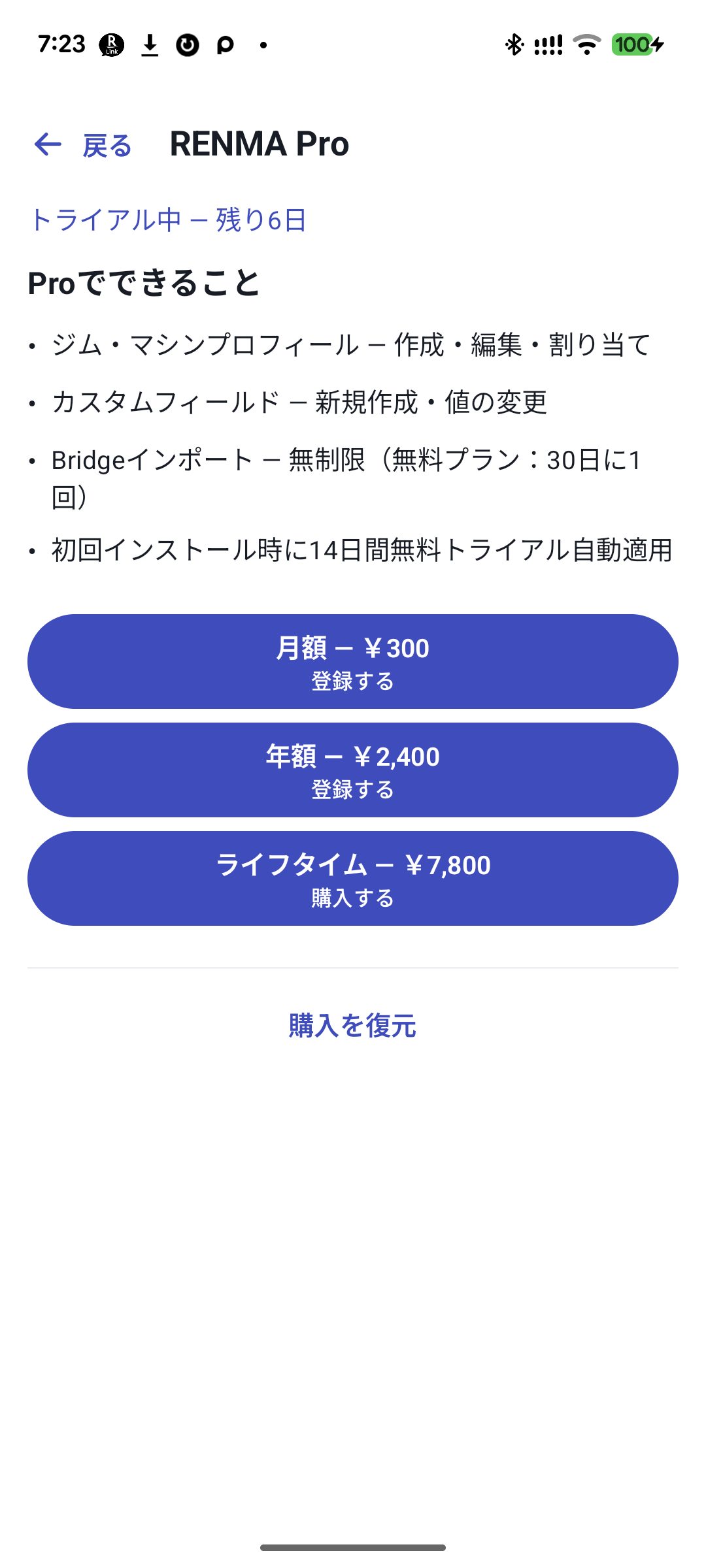
In “More” → “RENMA Pro”, check your current access and remaining free-trial days.
 Enlarge image
Actual screen showing prices for Japan. Trial days reflect the capture date. Read Google Play's display when purchasing. Choose the features and price you want
Read monthly, yearly, and Lifetime prices and renewal terms. The annual price of 2,400 JPY works out to 200 JPY per month; it is not a plan billed at 200 JPY each month.
Confirm purchases in Google Play
On the Google Play screen opened from the app, check the account, amount, and renewal terms and confirm yourself. The purchase-time display takes precedence over this website.
Restore a purchase that is not showing
Check connectivity and the Google account used for purchase, then restore purchases from the plan screen. This is separate from restoring record backups.
Manage renewal and cancellation in Play
Open Google Play from subscription management. Deleting the app alone does not cancel a subscription.
Free and Pro features
| Feature | Free | Pro, Lifetime and free trial |
|---|---|---|
| Basic logging, independent left/right, history, and basic analysis | Available | Available |
| Creating exercises and routines | No count limit | No count limit |
| Creating custom fields, entering new values, and custom analysis | Not included | Available |
| New gym and machine setup and assignments | Not included | Available |
| Viewing and exporting saved custom values and machine information | Available | Available |
| CSV/JSON export, backup, and restore | Available | Available |
| Bridge import | One slot per 30 days after a successful import | No limit on imports |
Creating or changing custom field or machine definitions through Bridge requires Pro access separately from the import allowance.
No automatic charge when your 14-day trial ends
The free trial ending does not automatically charge you. Try Pro features during the trial. When it expires and you return to Free, saved history remains and you can read past custom values and machine information. Requirements change for entering new values and using custom analysis.
Purchase status while offline
If a subscription cannot be checked online, the reference grace period is 72 hours from the last successful check. Lifetime is handled differently after validation, including continued access in the same installation. If the display does not match, restore and recheck purchases with connectivity.
Moving from monthly or yearly to Lifetime
If you have an auto-renewing subscription, there are restrictions on purchasing Lifetime alongside it. Check renewal status in Play and follow the app's guidance. This is not intended to add duplicate recurring payments.
Related features
The screens use sample records to explain the controls.
Updated: October 27, 2026