
Use metrics suited to the exercise
| Tracking type and metric | What it shows | How to read it |
|---|---|---|
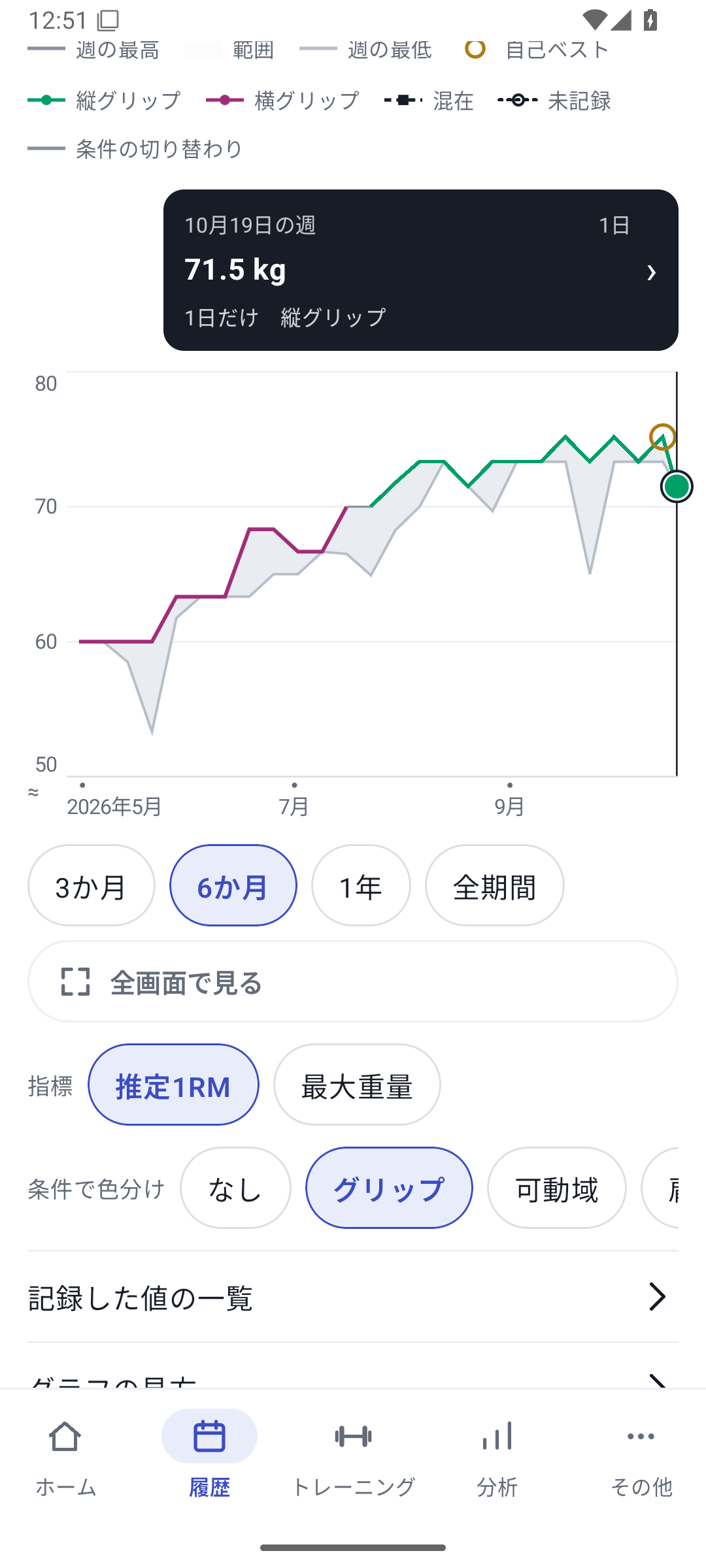
| Strength for weight × reps | Estimated 1RM using the Epley formula | Follow trends with the same equipment and conditions. This is different from a measured 1RM. |
| Bodyweight strength | A rep-based metric | Also check added weight or assistance in History. |
| Time and reps | Duration or reps suited to the tracking type | Do not treat numbers from different types as the same measure of ability. |
| Volume | Total work according to the tracking type | Do not add weight × reps and weight × seconds as if they shared a unit. |
| RPE | Recorded perceived effort | Compare using a consistent scale without treating missing values as 0. |
Personal-best markers depend on the exercise type and equipment scope. Avoid comparing a best from a different machine as if the conditions were the same.
 Enlarge image
How to use it in a workout
Choose an exercise
Search and open an exercise under exercise analysis in the Analysis tab. Choose muscle-group analysis for muscle-based summaries.
Choose period and equipment
Select the machine and period you want to compare under the same conditions. Check whether records without an assigned machine are included.
Switch metrics
Choose strength, volume, RPE, or another metric and read the axis units.
Compare two values in landscape
Choose two metrics under “Two values” and switch between stacked, overlaid, and scatter views. Independent left/right exercises use their own side and difference views.
Return to a record of interest
Select a point or interval in the standard trend graph to open records for the relevant day, week, or month. Read the original sets and conditions.
Match equipment, muscle scope, and period
In exercise analysis, search or sort to open an exercise, then choose equipment using the machine chips. Machines belonging to a gym appear with the gym name. In muscle-group analysis, distinguish primary and secondary muscles and check which exercises enter the summary.
Matching equipment and summary scope makes changes in training easier to compare.
Relationships between strength, RPE, and numeric fields
Open “Two values” in the detailed landscape graph to view two metrics stacked, overlaid with two axes, or as a scatter plot. Explore questions such as whether RPE decreased at the same strength, or whether strength differed on days with a different movement duration.
The RPE and ordinary numeric custom field values being compared generally correspond to the strongest set of that day. They are not averages across all sets. Fields with custom rep-count units may be summed, so read the field's meaning together with its aggregation method.
Return to original records even across long periods
Trends are grouped by day, week, or month according to the displayed range. The general rule is daily up to 10 weeks, weekly up to 60 weeks, and monthly beyond that. Frequency uses different aggregation rules. Select a point or grouped interval in the detailed graph to open the records behind the values.
Scatter plots use pairs from training days with both values; a missing value is not filled with 0. A correlation coefficient requires at least 8 pairs with variation in both values. A relationship does not establish its cause.
Basic and custom analysis
Basic history and analysis are available with Free. Custom field analysis requires Pro, Lifetime, or the initial free trial. Independent left/right exercises have side, difference, and rep views with different support from two-value comparison and condition coloring.
Related how-to guides
Updated: October 27, 2026